Modern businesses do not build successful customer relationships through isolated data alone. Every customer account, contact, opportunity, stakeholder, partner, and related record can influence business decisions. However, when this information is spread across multiple records and screens, understanding the complete Dynamics 365 relationship structure can become challenging.
This is where Dynamics 365 relationship mapping becomes valuable.
Instead of manually opening multiple CRM records to understand how customers and stakeholders are connected, businesses can use visual relationship mapping to see connections in a clear and structured format. A visual Dynamics 365 relationship view can help sales teams, customer service teams, account managers, and CRM administrators understand complex business networks faster.

One solution designed specifically for this purpose is Map My Relationships by Inogic. The application provides an interactive way to visualize relationships between Dynamics 365 records through Mind Map, Tree View, and Hierarchy Control layouts. It allows organizations to transform complex CRM data into an easier-to-understand visual experience.
But why is relationship visualization becoming increasingly important for CRM users? Let's explore.
What Is a Dynamics 365 Relationship?
A Dynamics 365 relationship represents the connection between different records within the CRM system. These relationships can exist between Accounts, Contacts, Opportunities, Cases, custom entities, and other business records.
For example, a business may have:
- A parent company connected to multiple subsidiaries
- Multiple contacts associated with one account
- Decision-makers linked to an opportunity
- Stakeholders influencing a sales process
- Partners connected to customer accounts
- Parent-child relationships between CRM records
When organizations manage hundreds or thousands of CRM records, identifying these connections through traditional record navigation can take significant time.
A visual Dynamics 365 relationship mapping approach helps users understand these connections from a single workspace rather than moving repeatedly between forms, subgrids, and related records.
Why Traditional CRM Navigation Can Be Challenging
Imagine a sales representative preparing for an important customer meeting.
The representative needs to understand:
- Who are the key decision-makers?
- Which contacts influence the buying decision?
- What opportunities are associated with the account?
- Are there subsidiary companies involved?
- Who are the important stakeholders?
- What previous activities have been completed?
- How are different records connected?
Without relationship visualization, users may need to open multiple CRM records individually.
This process can result in:
- Increased time spent searching for information
- Difficulty understanding account structures
- Missed stakeholder relationships
- Limited visibility into customer networks
- Slower decision-making
- Reduced CRM productivity
A well-designed Dynamics 365 relationship visualization can address these challenges by presenting connected records in a graphical and interactive format.
The Importance of Dynamics 365 Relationship Mapping
Relationship mapping helps transform disconnected CRM information into meaningful visual insights.
Instead of simply viewing lists of related records, users can see how records connect with each other. This makes it easier to understand customer ecosystems and business structures.

A strong Dynamics 365 relationship mapping solution can help organizations:
Understand Customer Networks
Customers often have complex organizational structures. A visual relationship map can help teams understand connections between parent companies, subsidiaries, departments, contacts, and stakeholders.
Identify Key Stakeholders
Sales teams need to know who influences purchasing decisions. Relationship visualization can make it easier to identify decision-makers, influencers, sponsors, and other important contacts.
Improve Account Management
Account managers can gain a more complete understanding of customer relationships without repeatedly navigating through multiple CRM records.
Reduce Time Spent Searching
Instead of manually opening record after record, users can explore connected CRM data from a centralized visual interface.
Support Better Business Decisions
When teams understand the complete Dynamics 365 relationship structure, they can make more informed decisions about sales, customer engagement, and account strategies.
Visualizing Dynamics 365 Relationships with Map My Relationships
Among the available tools designed for CRM visualization, Map My Relationships by Inogic focuses on helping organizations visualize and manage CRM connections directly within Dynamics 365.
The application enables users to visualize relationships between Accounts, Contacts, Opportunities, and custom entities through interactive visual layouts. According to the product information, users can explore relationships using Mind Map, Tree View, and Hierarchy Control.
The key advantage is that users can explore connected CRM records without relying solely on traditional record navigation.
Mind Map View for Dynamics 365 Relationship Visualization
One of the most useful approaches to understanding complex CRM connections is through a Mind Map.
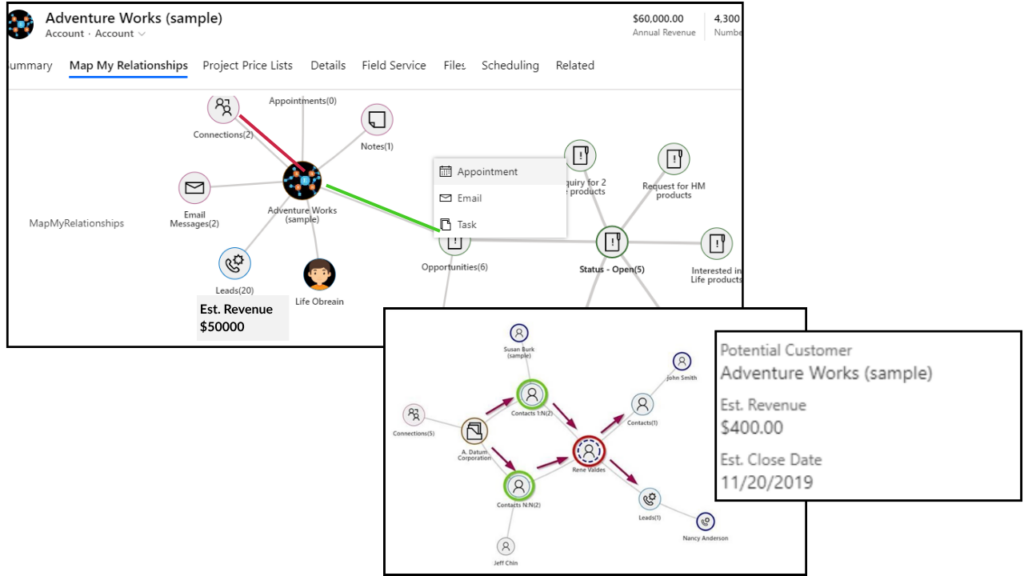
The Mind Map View available through Inogic's Map My Relationships provides an interactive way to explore connected records around a central entity.
For example, users can start with a customer account and visually explore:
- Associated contacts
- Opportunities
- Related accounts
- Connected stakeholders
- Custom entities
- Multiple levels of relationships
This creates a more intuitive Dynamics 365 relationship experience compared to viewing disconnected records separately.
The visual format can help users quickly understand the overall relationship structure and explore deeper connections when required. The solution also supports actions directly from the visual workspace, reducing the need to continuously switch between CRM screens.
How a Mind Map Can Improve CRM Productivity
Think about how people naturally understand complex information.
A visual diagram is often easier to interpret than a long list of records.
The same principle applies to CRM relationship management.
A Mind Map-based Dynamics 365 relationship view can help users:
- Explore multiple levels of connected records
- Identify important business relationships
- Understand stakeholder networks
- Navigate relationships more quickly
- View information in a centralized workspace
For sales professionals managing strategic accounts, this type of visualization can provide a clearer understanding of the people and organizations involved in the sales process.
Dynamics 365 Hierarchy Control for Complex Account Structures
Organizations frequently manage complex parent-child structures.
For example:
- Parent companies and subsidiaries
- Corporate groups
- Regional offices
- Departments
- Account hierarchies
- Contact hierarchies
A standard record-based CRM view may not always provide the easiest way to understand these structures.
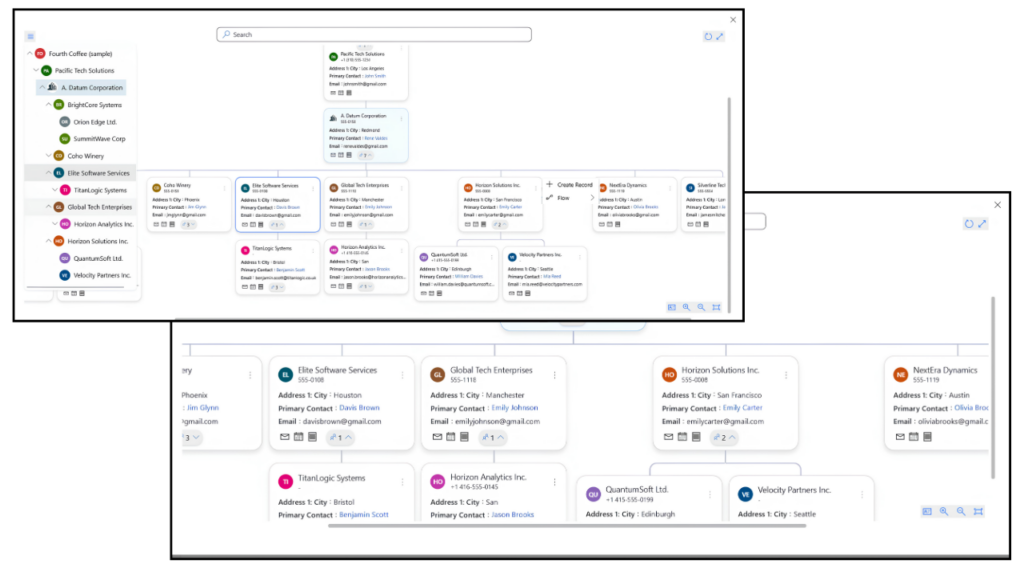
The Hierarchy Control offered through Map My Relationships by Inogic provides a structured visual representation of parent-child relationships. Users can explore account and contact hierarchies in a more organized format.
This can be especially useful for organizations managing enterprise customers with multiple connected business units.
Tree View for Structured Dynamics 365 Relationship Navigation
Another useful visualization format is Tree View.
Tree View presents relationships in a structured, top-to-bottom format. This can make it easier for users to explore multiple levels of parent-child relationships.
For example, users can visualize:
Parent Account
→ Regional Office
→ Department
→ Contact
→ Related Opportunity
This structured approach can simplify complex relationship navigation.
According to the product information, the Tree View supports relationship visualization while allowing users to navigate records, apply filters, explore structures, and take actions from the visual interface.
For businesses managing complex projects, cases, accounts, or organizational structures, Tree View can provide a practical way to understand the complete Dynamics 365 relationship hierarchy.
Take Action Directly from the Relationship Map
Visualization is useful, but the real value increases when users can take action from the same workspace.
A modern CRM relationship management solution should not simply display information. It should help users act on that information.
With Map My Relationships from Inogic, users can perform activities and manage related records directly from the relationship visualization. Depending on configuration and functionality, this can include creating activities, associating records, and triggering workflows.
This approach can help reduce unnecessary navigation and improve workflow efficiency.
Imagine seeing an important stakeholder during account research and immediately creating a follow-up task.
Instead of opening multiple screens, users can take action while reviewing the Dynamics 365 relationship structure.
Real-Time CRM Relationship Visibility
One major advantage of an integrated relationship mapping solution is that the visualization can remain connected to CRM data.
Static diagrams can quickly become outdated.
However, relationship visualization directly connected to Dynamics 365 can provide a more relevant view of current CRM connections.
The product information for Inogic Map My Relationships indicates that the relationship views work with CRM data to help users explore connected records and relationships in an interactive environment.
This makes the visualization more practical for daily CRM usage.
Key Benefits of Dynamics 365 Relationship Mapping
Implementing a visual Dynamics 365 relationship strategy can provide several benefits for organizations.
1. Better Visibility Into Customer Relationships
Teams can gain a clearer understanding of how Accounts, Contacts, Opportunities, and other records are connected.
2. Faster Access to Important Information
Users can reduce the time spent searching through multiple records.
3. Improved Stakeholder Identification
Relationship visualization can help teams identify decision-makers and influential contacts.
4. Easier Navigation of Complex Hierarchies
Parent-child relationships and account structures can be explored visually.
5. Improved Sales Preparation
Sales representatives can review customer relationships before meetings and develop better engagement strategies.
6. Increased CRM Productivity
Centralized visualization can reduce unnecessary navigation between CRM records.
7. Better Collaboration
Visual relationship maps can make complex customer information easier for teams to understand and discuss.
Who Can Benefit from a Dynamics 365 Relationship Mapping Tool?
A Dynamics 365 relationship visualization solution can support multiple business teams.
Sales Teams
Sales professionals can identify key stakeholders, understand buying influences, and explore account relationships.
Account Managers
Account managers can gain a broader understanding of customer structures and related contacts.
Customer Service Teams
Service teams can understand relationships between customers, contacts, cases, and related records.
CRM Administrators
Administrators can provide users with a more intuitive way to navigate complex CRM relationships.
Business Leaders
Managers can gain better visibility into important accounts and organizational structures.
Supporting Standard and Custom Entities
Every organization uses Dynamics 365 differently.
Some businesses primarily work with standard entities, while others rely heavily on custom entities designed around their unique processes.
For this reason, flexibility is important in a Dynamics 365 relationship mapping solution.
Map My Relationships from Inogic supports relationship visualization across standard and custom entities, allowing organizations to configure relationship views based on their business requirements.
This flexibility can be valuable for organizations operating in industries with specialized CRM processes.
Customizing the Relationship View
Not every user needs to see the same information.
Sales teams may want to focus on stakeholders and opportunities, while service teams may need visibility into cases and contacts.
A customizable Dynamics 365 relationship view allows organizations to configure how relationships are presented.
The available product information highlights options such as:
- Custom entity selection
- Relationship configuration
- Color-coded connections
- Custom labels
- Filters
- Personalized node layouts
- Multiple visualization formats
These capabilities can help organizations create relationship views that align with their specific CRM processes.
Why Visual CRM Data Is Becoming More Important
CRM systems contain large amounts of valuable data. However, data alone does not always provide insights.
The challenge is understanding the context behind that data.
For example, a list of ten contacts does not immediately explain:
- Who is the decision-maker?
- Who influences the purchase?
- Which contact belongs to which department?
- How are different contacts connected?
- Which relationships are most important?
Visual CRM data can provide context.
A visual Dynamics 365 relationship map transforms separate records into a connected business story.
This can make CRM information easier to understand and use.
Questions Businesses Should Ask Before Choosing a Relationship Mapping Tool
Before selecting a relationship visualization solution, organizations should consider several questions.
Does the Solution Work Directly Within Dynamics 365?
Integrated solutions can reduce the need to move data between different platforms.
Can It Visualize Multiple Levels of Relationships?
Complex organizations may require multi-level relationship exploration.
Does It Support Custom Entities?
Businesses with customized Dynamics 365 environments need flexibility.
Can Users Take Action From the Visual Interface?
The ability to create activities and manage records can improve productivity.
Does It Provide Multiple Visualization Options?
Different users may prefer Mind Map, Tree View, or Hierarchy layouts.
Can the View Be Customized?
Organizations should be able to configure the visualization based on business requirements.
These factors can help businesses choose a Dynamics 365 relationship mapping solution that fits their CRM environment.
How Inogic's Map My Relationships Stands Out
From a third-party perspective, the key strength of Map My Relationships by Inogic is its focus on making complex CRM relationships easier to understand visually.
Rather than limiting users to traditional CRM navigation, the application provides multiple ways to explore connected records.
The combination of:
- Mind Map View
- Tree View
- Hierarchy Control
- Relationship visualization
- Connection visualization
- Custom entity support
- Interactive navigation
- Direct actions from the map
makes it a practical option for organizations looking to improve their Dynamics 365 relationship management.
Inogic has designed the solution to support relationship visualization directly within the Dynamics 365 environment, helping teams explore customer connections without relying on external diagramming tools.
For businesses with large and complex CRM databases, this type of functionality can help make relationship data more accessible and actionable.
The Future of Dynamics 365 Relationship Management
CRM platforms continue to evolve beyond simple customer databases.
Modern organizations need to understand not only individual customer records but also the networks surrounding those customers.
A successful sales opportunity may involve:
- Multiple decision-makers
- Internal influencers
- Sponsors
- Partners
- Subsidiary companies
- Related business units
Understanding these connections can provide a competitive advantage.
This is why visual Dynamics 365 relationship mapping is becoming increasingly relevant for organizations that manage complex customer ecosystems.
Tools such as Map My Relationships by Inogic demonstrate how CRM visualization can transform traditional record navigation into a more interactive and insightful experience.
Final Thoughts: Is Dynamics 365 Relationship Mapping Worth It?
If your organization spends significant time navigating between multiple CRM records to understand customer connections, relationship mapping may be worth considering.
A visual Dynamics 365 relationship view can help teams:
- Understand complex customer networks
- Identify important stakeholders
- Navigate account hierarchies
- Explore connected CRM records
- Improve sales preparation
- Reduce manual record searching
- Take action from a centralized workspace
The most important question is simple:
How quickly can your team understand the complete customer relationship story inside Dynamics 365?
If the answer involves opening multiple records, searching through subgrids, and manually connecting information, a visual relationship mapping approach could significantly improve the CRM experience.
For organizations looking to visualize CRM relationships through interactive Mind Maps, Tree Views, and Hierarchy Control, Inogic's Map My Relationships offers a focused solution built around Dynamics 365 relationship mapping and CRM data visualization.
As customer relationships become more complex, businesses that can clearly visualize and understand those connections may be better positioned to improve customer engagement, strengthen account management, and make faster, more informed business decisions.
Comments